Set up sending · Updated Oct 8, 2026
Warm-up
In short
Warm-up has a mailbox send a few ordinary emails a day to SendPath's own seed mailboxes, which open them, rescue them from spam and reply. Gmail and Outlook learn your mail is wanted. New mailboxes need about two weeks.
Start warm-up
- Step 1: On Warm-up, click Start warm-up on a mailbox. Or tick Warm up this mailbox when you connect it.
- Step 2: Set up the warm-up filter if the page asks you to (see Keeping warm-up out of your inbox).
- Step 3: Leave it running. The mailbox shows Ready once it has earned enough trust.
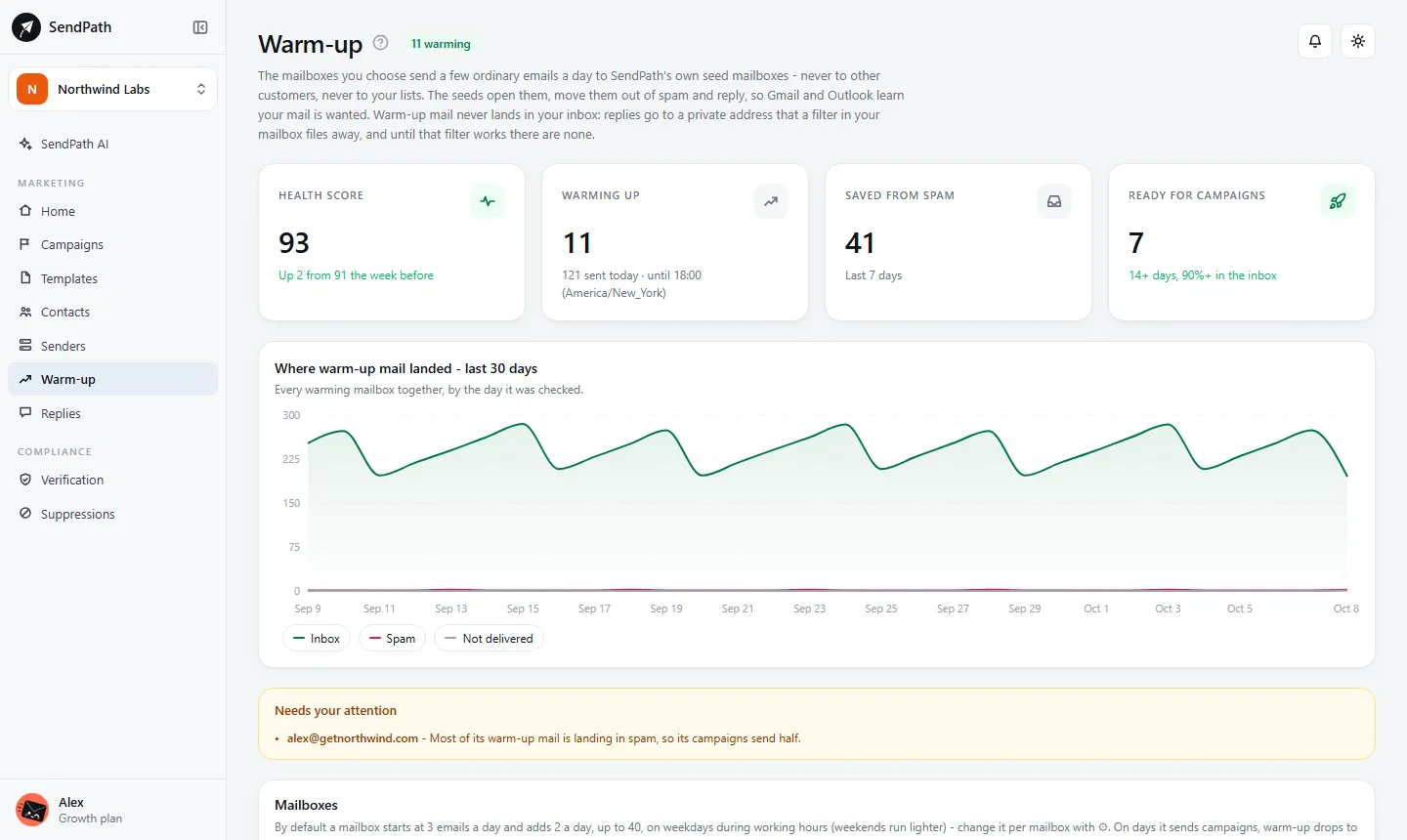
- Warm-up is off until you start it. It's never switched on for you.
- Your mailboxes only ever write to SendPath's seed mailboxes - never to other customers, never to your lists.
- A mailbox warms up in one workspace only. Connected in two, it stays paused in the second, so its volume doesn't double.
How long it takes
- Start
- Default: 3 a day
- What it means: Day 1 sends 3 warm-up emails.
- Ramp speed
- Default: +2 a day
- What it means: Each day adds this many (1 to 5).
- Daily limit
- Default: 40
- What it means: Warm-up emails a day at full ramp (5 to 50).
- Weekends
- Default: Lighter
- What it means: 40% of a weekday, like a real person. Or Off, or the same as weekdays.
- Ready
- Default: 14+ days
- What it means: And 90% or more of the last 20+ emails reached the inbox.
You can start campaigns before a mailbox is Ready, at low volume. A mailbox that has been sending well elsewhere can skip the slow start: tick It's already warmed up when you connect it, or tick its row on Warm-up and click Already warm. It still has to prove its inbox placement.
Keeping warm-up out of your inbox
The seeds' replies go to a private address of your mailbox, and a filter files them away as they arrive. Until that filter works, there are no replies.
- Google Workspace
- SendPath creates the Gmail filter itself, when you allow it at connect time.
- Microsoft
- Tick the warm-up box when you connect, and allow the extra Microsoft prompt (Allow warm-up replies). SendPath then creates the Outlook rule.
- Any other mailbox
- The mailbox's panel on Warm-up shows the filter's exact settings to add in your mail app. Then click Test the filter; replies start once the test lands in the warm-up folder.
Reading the Warm-up page
- Status
- Off, Warming up, Ready, On hold, Paused, or Auto-paused.
- Health
- Out of 100: the share of its warm-up emails that reached the inbox in the last 7 days. 90+ is healthy.
- Today
- Warm-up emails sent today, against today's target.
- Inbox placement (7 days)
- Where its warm-up mail landed: inbox, spam or not delivered, per provider (Gmail, Outlook, others).
- Ready
- Whether it's ready for full campaign volume, or what it's waiting for.
- Saved from spam
- Warm-up emails that landed in spam and were moved to the inbox. That's what teaches providers.
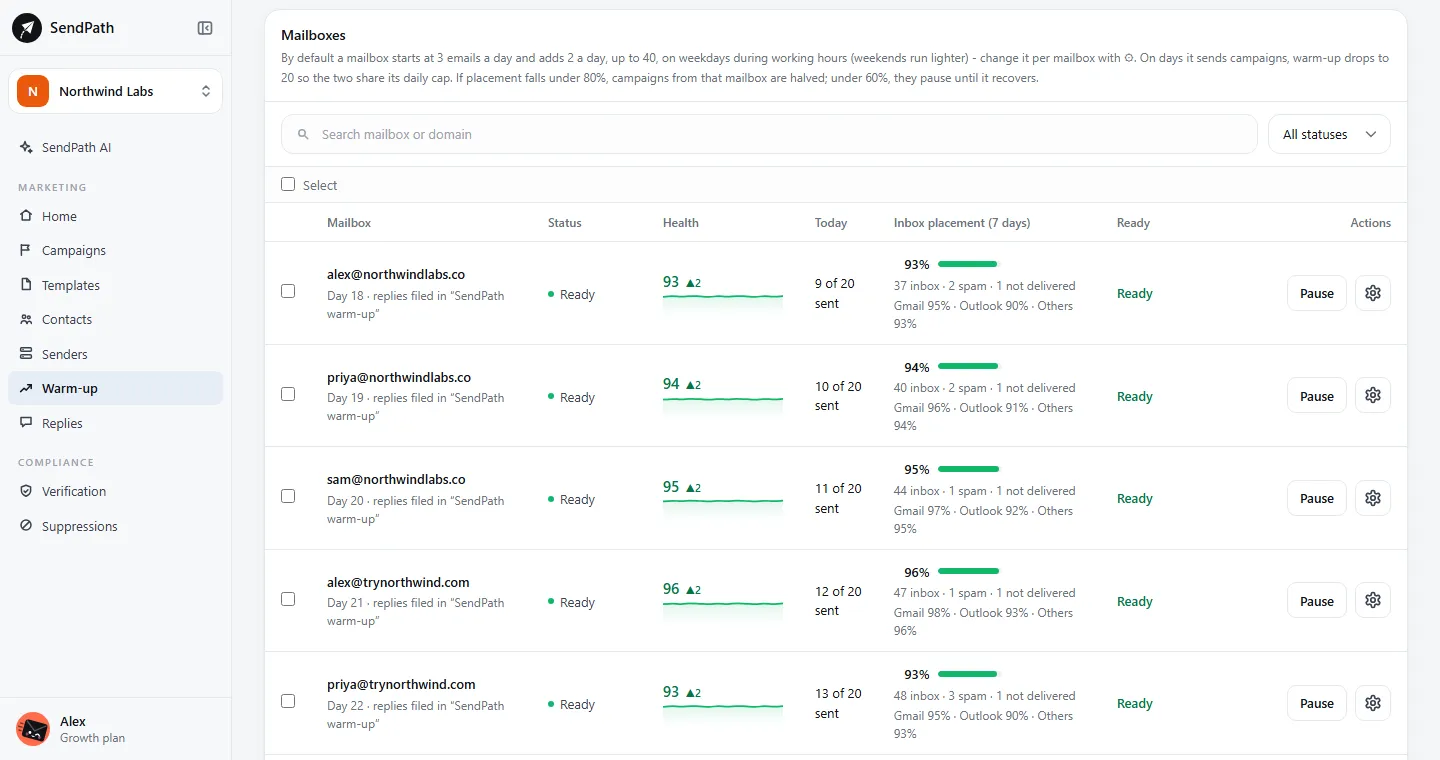
The gear on a row opens the mailbox's details and settings. Tick several rows to start, pause or restart them together, or change their settings in one go.
How placement affects your campaigns
- 80% or more
- Campaign emails from this mailbox: Normal
- Under 80%
- Campaign emails from this mailbox: Halved
- Under 60%
- Campaign emails from this mailbox: Held until placement recovers
This kicks in once a mailbox has at least 20 warm-up results from the last 7 days.
If something's wrong
- The Today column stays at 0.
- Warm-up sends during the day in the workspace's timezone, and lightly on weekends. Check the mailbox isn't Paused and its health isn't Blocked.
- Warm-up emails or replies show up in my inbox.
- The filter isn't working. Open the mailbox on Warm-up and click Test the filter (or Test again).
- A mailbox is On hold or Auto-paused.
- Its mail is landing in spam, or the mailbox has a health problem. Fix what Senders shows, check DNS, and keep warm-up running: placement usually recovers within a week.
Was this page helpful?
Related
Something missing or wrong? Email support@sendpath.ai.