Write and send · Updated Oct 9, 2026
Campaigns
In short
A campaign sends a sequence of emails to a list, from the mailboxes you pick, inside the schedule you set. Nothing sends until every gate check passes.
Create and launch a campaign
- Step 1: On Campaigns, click Create New. Give it a name, pick the mailboxes to send from (Senders) and the list, and optionally start from a template. Without a list, add the contacts on the campaign's Contacts tab, or click Use an Existing List there to pick one from Contacts.
- Step 2: On the Editor tab, write the first email and its follow-ups.
- Step 3: On the Settings tab, check the schedule. The mailboxes and the list can be changed there too, under General.
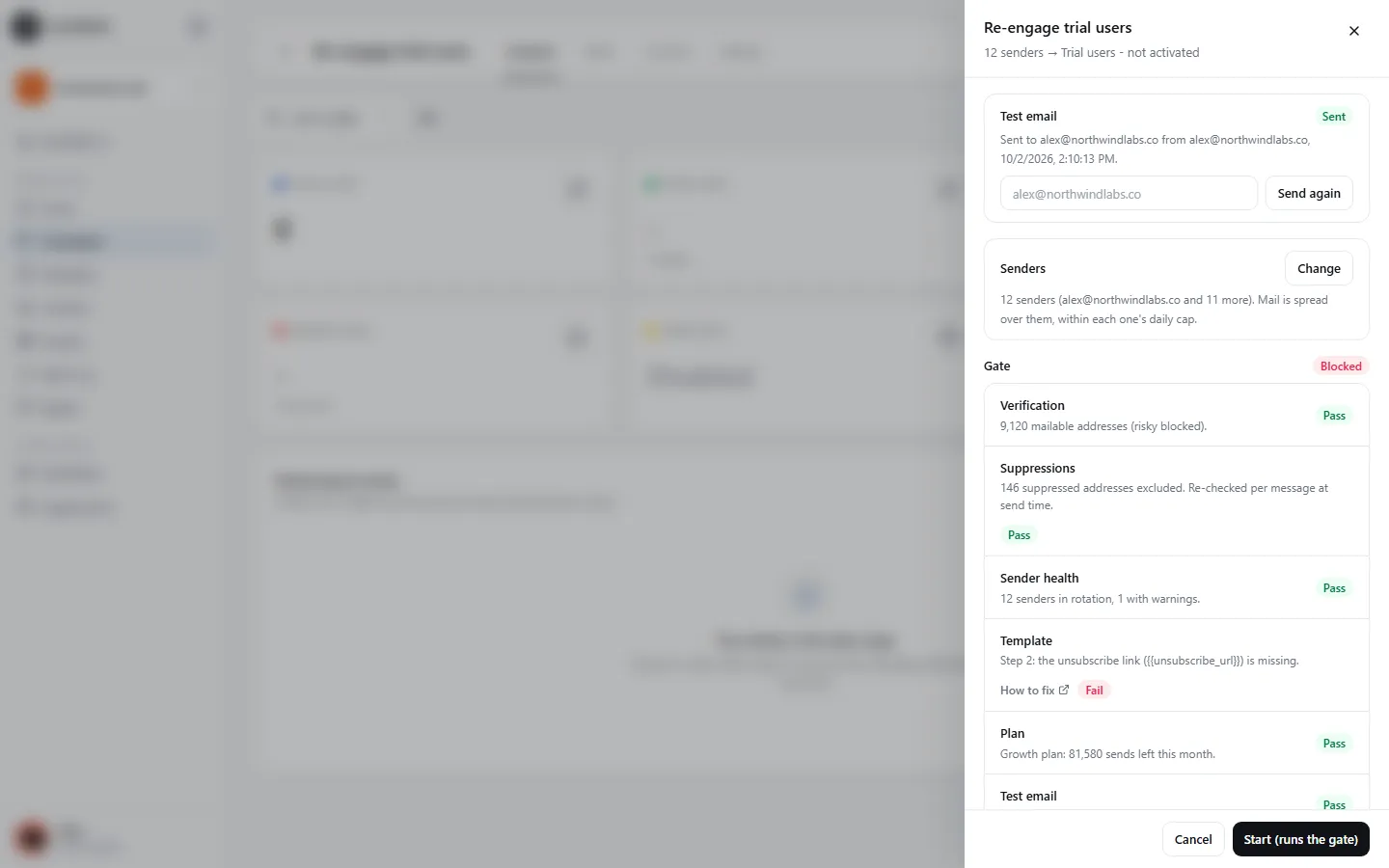
- Step 4: Click Launch. In the panel, Send test to yourself and check it arrived.
- Step 5: Click Start (runs the gate). If anything fails, the panel lists what to fix; when everything passes, the campaign starts at its next sending window.
The sequence
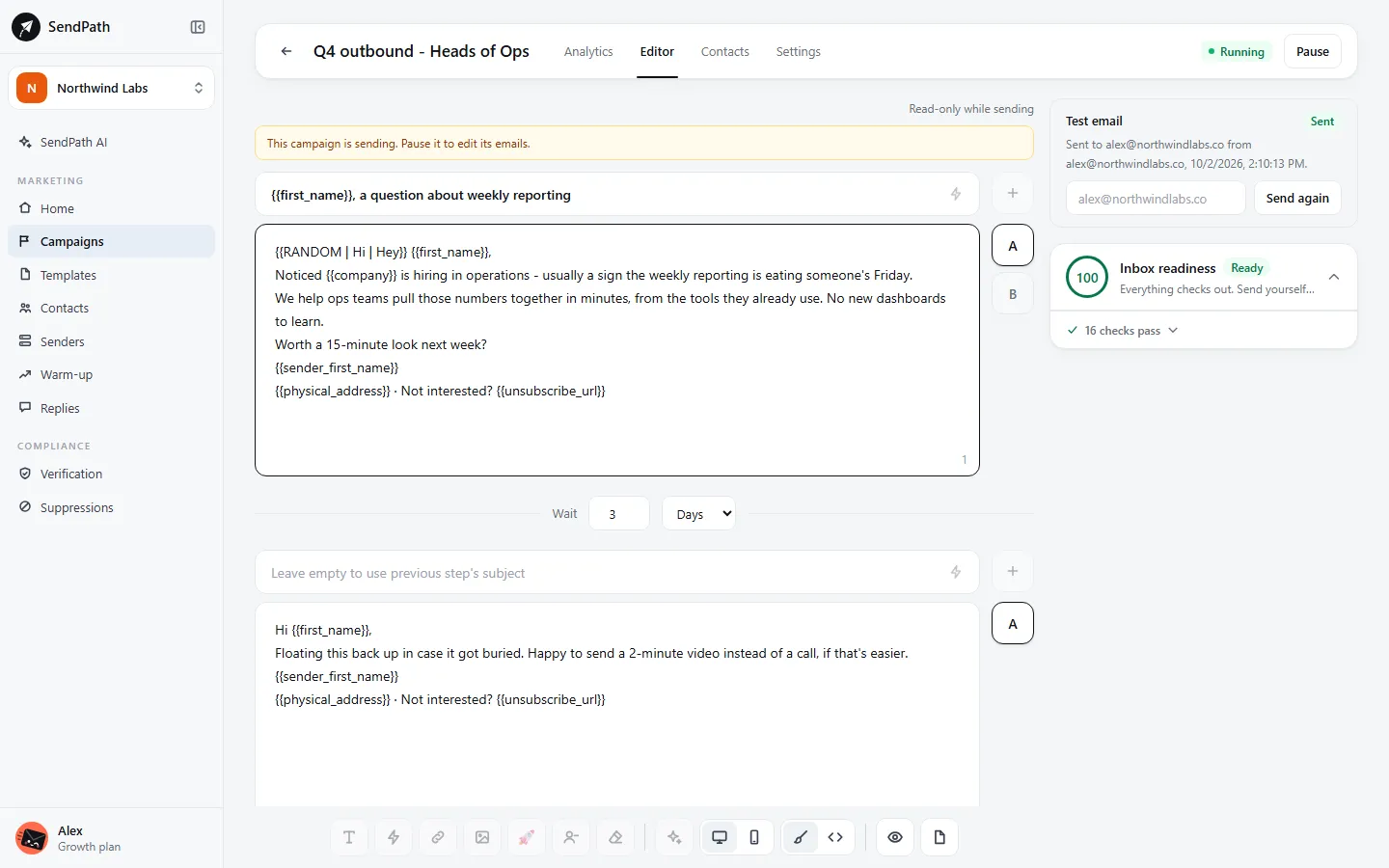
- Up to 10 steps. Step 1 goes to everyone; each later step goes to those who haven't replied, after the wait you set (in days or hours).
- A follow-up with an empty subject is sent as a reply in the same thread. Give it a subject only to start a new thread.
- Load a template into any step, or write it there. Save as template keeps the email you're on for later.
- A reply stops the sequence for that contact.
- While a campaign is sending, its emails are read-only. Pause it to edit them.
A/B variants
The + beside a step adds a variant, up to 5 (A to E). Contacts are split evenly between them. Turn onAuto-pick the best A/B variant on the Settings tab, choose a metric (reply rate, interested replies, opens or clicks), and SendPath sends only the winner once each variant has at least 100 sends and one clearly leads, or at 300 sends each.
Schedule
New campaigns send during office hours: Monday to Friday, 9:00 to 17:00, in your workspace's timezone. Under Schedule & Limits on the Settings tab you can change the days, hours and timezone, add more schedules, and set dates to start and stop sending.
Sending rules
- Daily limit
- The most emails this campaign sends in a day, across all its mailboxes.
- Time gap between emails
- Per mailbox, across all its campaigns: after each email it waits the minimum plus a random extra, so sending looks like a person's.
- Max new leads per day
- How many new contacts it starts a day. Follow-ups don't count and keep going.
- Prioritize new leads
- Reach new contacts before scheduled follow-ups.
Each mailbox's own daily cap still applies on top of these.
Open and link tracking
Both start off, because they can lower inbox placement for cold email. Switch them on per campaign under Tracking on the Settings tab; a change applies to the emails sent from then on.
- Open tracking
- Adds an invisible image to each email. Apple Mail and some security gateways load images by themselves, so opens run high.
- Link tracking
- Sends the email's links through a SendPath redirect to count clicks. The unsubscribe link is never changed.
Results
The Analytics tab shows sends, reply rate, opportunities (interested replies) and bounce rate, plus opens and clicks when tracked, with each A/B variant's results. The Contacts tab shows where each contact is:
- Not sent
- Not reached yet.
- Sent
- At least one email went out.
- Replied / Interested
- They answered. Their sequence has stopped.
- Bounced
- The address doesn't exist. It's now suppressed.
- Skipped
- A gate check failed at send time: suppressed, invalid, or missing a value.
- Failed
- The mailbox couldn't send it. A follow-up is tried again, up to three times an hour apart.
Campaign statuses
- Draft
- Not launched yet.
- Blocked
- A gate check failed. Open Launch to see what to fix.
- Running
- Sending inside its schedule.
- Paused
- Stopped by you or by a problem. Resume runs the gate again.
- Done
- Every contact has finished the sequence.
If something's wrong
- Start is greyed out.
- Send a test email first, from the same panel. It's required, and again after the emails change.
- It's running but sends very little.
- It only sends inside its schedule, within each mailbox's daily cap, with a gap between emails. Mailboxes whose warm-up placement is low send half or nothing. See Sending is slower than expected.
- I can't edit the emails.
- A running campaign's emails are locked. Pause it, edit, then Resume.
Was this page helpful?
Related
Something missing or wrong? Email support@sendpath.ai.