Write and send · Updated Oct 9, 2026
The pre-send gate
In short
The gate is a set of checks that keeps your mailboxes and domain safe. It runs when you launch a campaign, and again just before every single email. Nothing in the app can skip it.
You click Launch
Before every email
The gate checks
- Verification
- Suppressions
- Sender health
- Template
- Plan
- Test email
Everything passes
The campaign starts in its next sending window. The email is sent.
Anything fails
The campaign is Blocked, with each fix listed. The email is skipped.
The checks
- Verification
- Passes when: The list is imported and some addresses aren't invalid. Verifying it is recommended, not required: the check passes with a warning when it isn't verified.
- How to fix it: Run the check on Verification.
- Suppressions
- Passes when: Some addresses aren't suppressed. Each email checks its own address again.
- How to fix it: Use a list you haven't emailed before. See Suppressions.
- Sender health
- Passes when: At least one of the campaign's mailboxes isn't Blocked. Blocked ones are skipped.
- How to fix it: Fix what Senders shows. See Mailbox health.
- Template
- Passes when: Every email has a subject (step 1), the unsubscribe link and your address, and the list can fill every variable.
- How to fix it: Fix the email in the Editor. See Variables.
- Plan
- Passes when: The workspace has an active plan with emails left this month.
- How to fix it: Choose or upgrade a plan. See Plans and billing.
- Test email
- Passes when: A test of the campaign's current emails was sent.
- How to fix it: Send a test from the Launch panel.
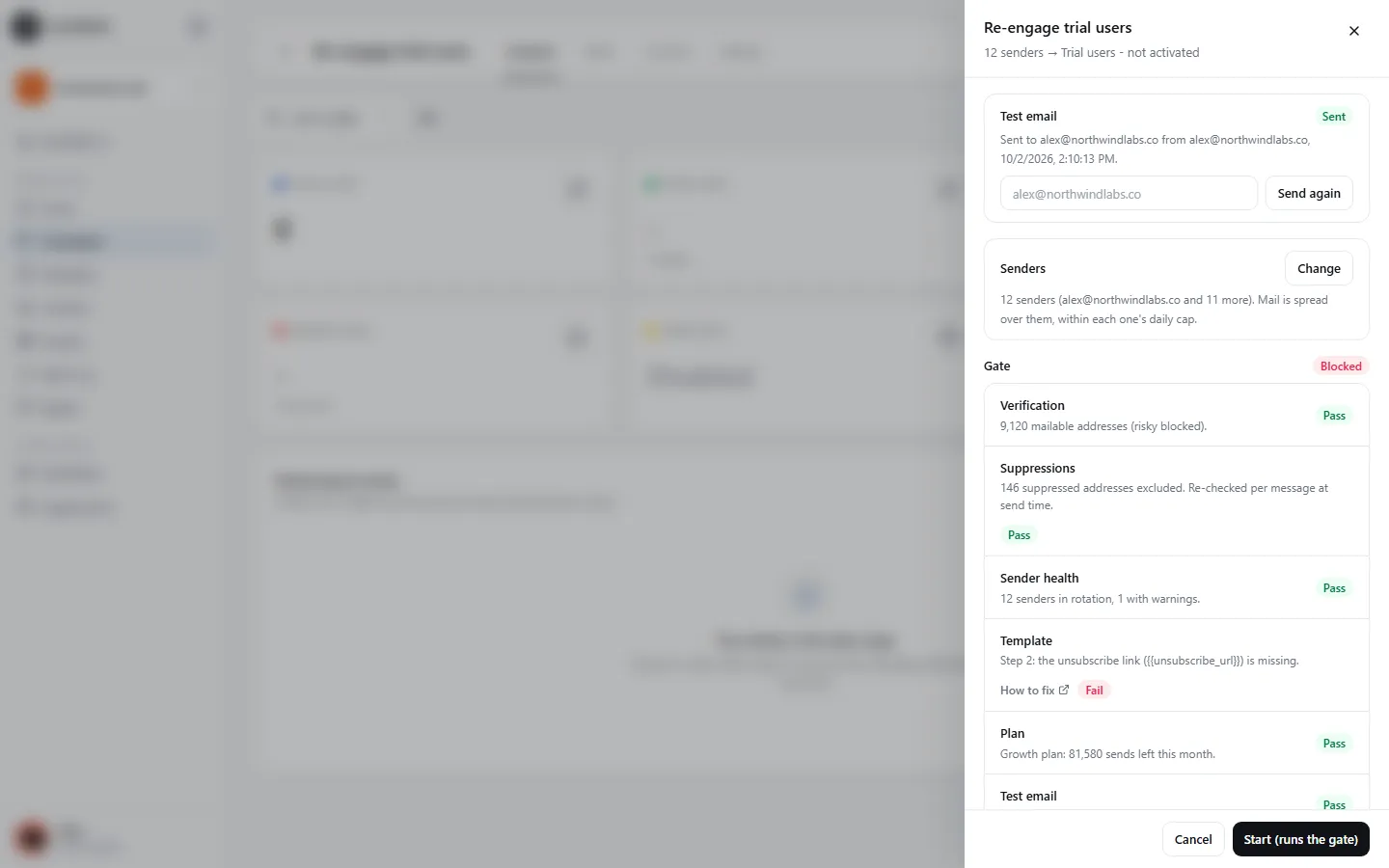
A campaign that fails a check is Blocked, and the Launch panel lists each failing check with its fix. An email that fails at send time is skipped and recorded. Every decision is logged.
Ask why
Ask SendPath AI Why is this blocked? on a blocked campaign. It explains every problem, with the fix and a link to the page that fixes it. Every message is also explained in Messages explained.
If something's wrong
- The campaign is Blocked but I fixed everything.
- The gate runs again only when you ask. Click Launch (or Resume) again.
- It says the emails changed after the last test.
- Any edit to a subject or body needs a new test. Send one from the Launch panel.
Was this page helpful?
Related
Something missing or wrong? Email support@sendpath.ai.