Your audience · Updated Oct 8, 2026
Suppressions and unsubscribes
In short
A suppressed address is never emailed again from your workspace, even when every other check passes. Unsubscribes and bounces are added for you.
How addresses get suppressed
- Someone clicks the unsubscribe link in your email and confirms, or uses their mail app's Unsubscribe button.
- A reply asks to be removed. SendPath AI's label and a keyword rule both catch it.
- An email to the address bounces.
- You add it: on Suppressions, Add address for one, or Import for a list.
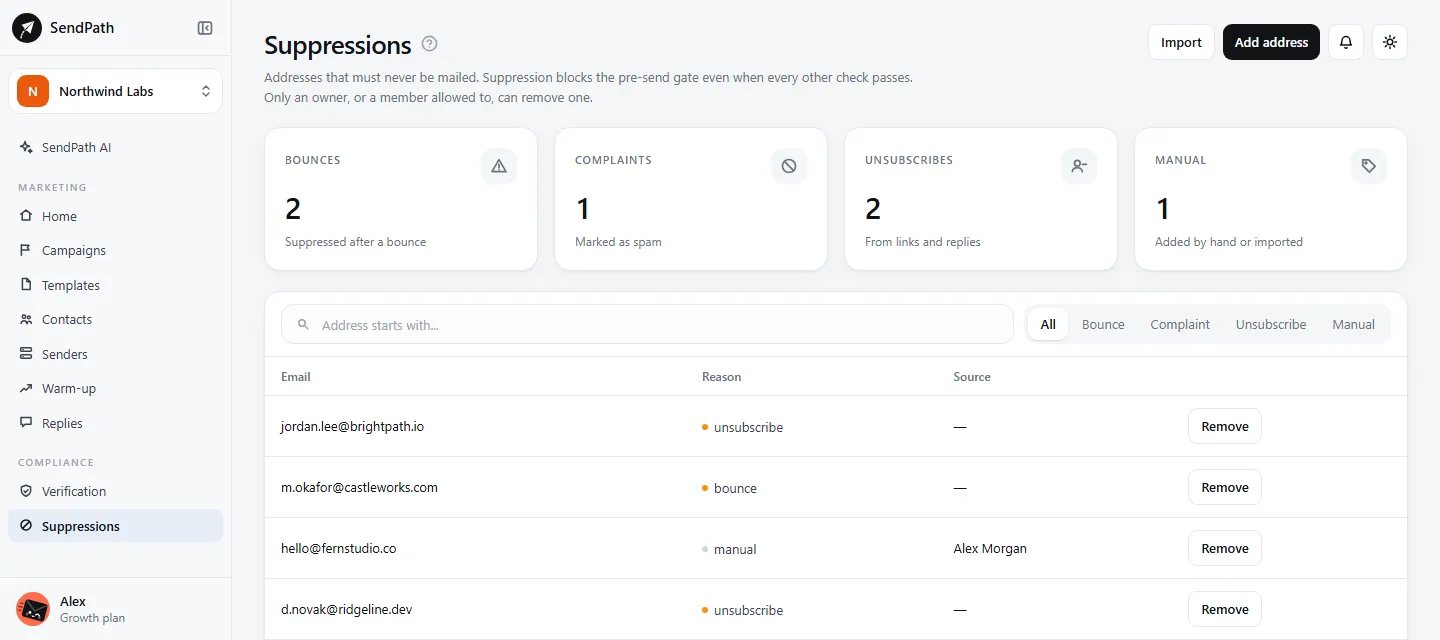
The Suppressions page sorts them into Unsubscribes, Bounces, Complaints and Manual. Suppressions are workspace-wide: they apply to every list and campaign.
The unsubscribe link
Every email must contain {{unsubscribe_url}}. It becomes a link to a page where the person confirms with one button. Opening the link alone changes nothing, because security scanners open links in emails.
Every email also carries the one-click unsubscribe headers that Gmail, Yahoo and other mail apps show as an Unsubscribe button next to your name. Either way, the address is suppressed at once.
Removing a suppression
- Step 1: On Suppressions, find the address and click Remove.
- Step 2: Give a reason. The removal is logged with your name.
An owner, or a member given the Suppressions: Remove permission, can remove one.
If something's wrong
- Every address in my list is suppressed.
- The list was emailed before and they all unsubscribed or bounced. Use a different list.
- Someone says they unsubscribed but got another email.
- Check Suppressions for their address. An email already handed to their server can arrive after they click; nothing is sent after the address is suppressed.
Was this page helpful?
Related
Something missing or wrong? Email support@sendpath.ai.